
Installation
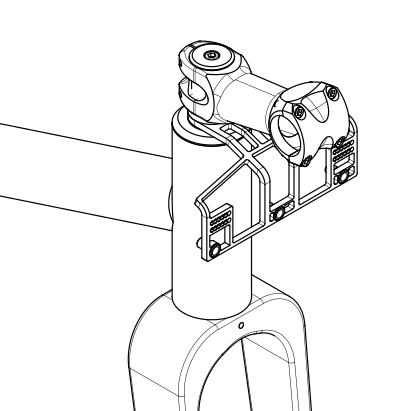
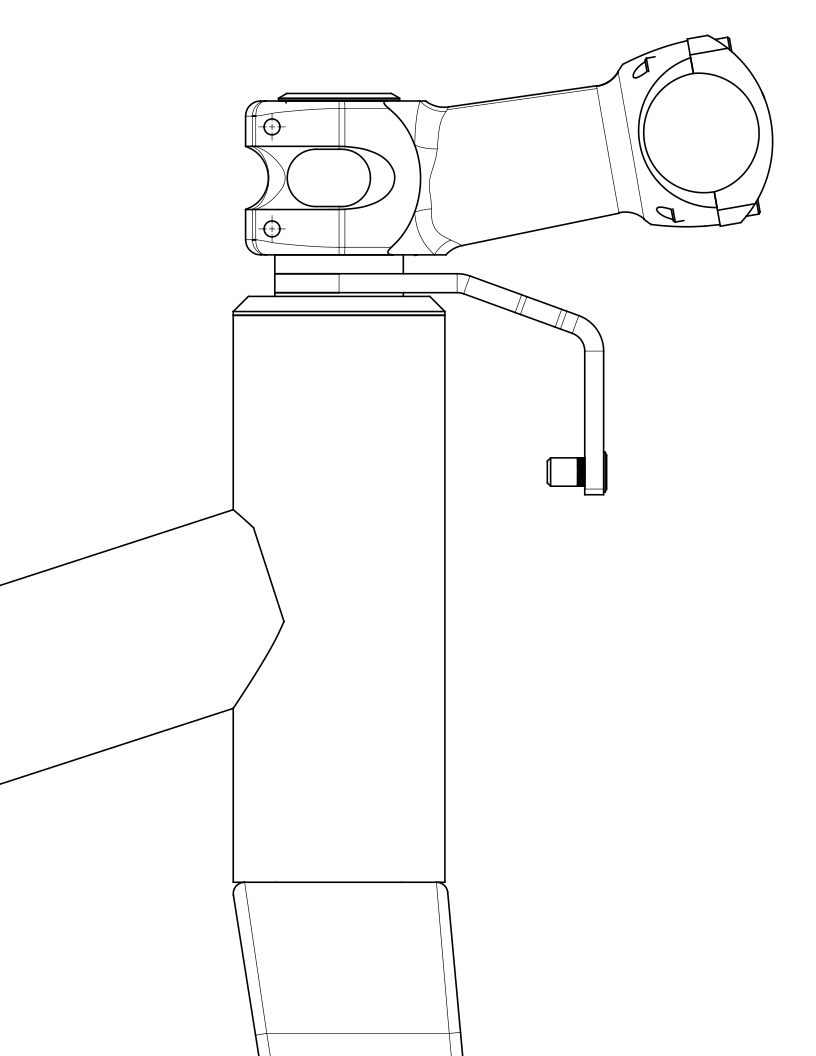
The Fauna Handlebar Bag Support replaces one stem spacer on a threadless steerer. If you have adjusted stem height before, the process should feel familiar. If not, move slowly and check each step before tightening everything back down.


Installation Steps
Section titled “Installation Steps”-
Loosen the stem: Loosen the two stem clamp bolts until the stem can rotate freely on the steerer tube. Loosen the top cap bolt, then remove the top cap and any spacers above the stem. Support the fork as you remove the top cap so it cannot slide out of the frame.
-
Remove the stem: Carefully slide the stem off the steerer tube. Lift it up and over the steerer as much as the cables allow, and avoid twisting or tangling the housing.
-
Remove a spacer: Remove a spacer from the steerer tube, preferably one with the same thickness as the support. The support replaces this spacer. If you need to keep the same stack height, reuse the removed spacer above the stem.
-
Position the support: Slide the support onto the steerer. It can sit near the headtube, near the stem, or between other spacers depending on your steerer length, bag position, and cable routing. Check for clearance before reinstalling the stem.
-
Install the stem and top cap: Slide the stem back onto the steerer and reinstall any spacers needed above or below it. The top of the steerer should sit slightly below the top of the stem or upper spacer so the top cap can preload the headset. Reinstall the top cap and tighten it lightly to remove headset play. Keep the stem clamp bolts loose for now.
-
Check for play: Apply the front brake and rock the bike back and forth. If you feel movement in the headset, tighten the top cap slightly and check again. Do not overtighten the top cap; notchy or gritty steering can be a sign of too much preload.
-
Align the stem and tighten: Align the stem with the front wheel and tighten the stem clamp bolts to the manufacturer’s recommended torque spec. Use a torque wrench if you have one. If not, tighten securely without over-tightening.
-
Safety check: Hold the front wheel between your legs and try to rotate the bars. If the bars move without the wheel moving, the stem clamp bolts may need more tension. If the wheel moves with the bars, continue to the next check.
-
Install your bag: Strap your handlebar bag to the handlebar. Attach the strap that would normally wrap around the head tube to the support instead.
-
Test clearance: Turn the bars fully left and right. Verify the cables move freely, the bag stays clear of the tire, and the support does not interfere with the frame or fork.
Post-Installation Checks
Section titled “Post-Installation Checks”- Adjust cable routing as needed for your specific setup. Every bike, bar shape, and bag is a little different.
- If the support interferes with your cables, consider using zip ties to guide the housing and keep it from moving around.
Strap (Optional)
Section titled “Strap (Optional)”The support includes a 3/4” wide nylon webbing strap for extra security. Loop the strap through the two jagged slots like a backpack adjuster, then route it around your stem and handlebar before tightening it back through the support.